Showing posts with label resources. Show all posts

Monday, June 27, 2011

3 Interactive Timelines

I'm attending the Model Schools Conference in Nashville, and before I forget, I wanted to share some of the resources that I've gathered over the past two days. Some of these resources come from other educators, and some come from presenters. I'm going to include some of these in resources on the pages at the (book) supplier, so you're more than welcome to take a look at them there, as well as other resources that I've compiled.

I think that poster board timelines are a little outdated, especially when students are used to doing searches for images and video on the internet.  When a presenter suggested we give Dipity a try, I thought about other interactive timeline interfaces I've heard about, and went into my Evernote files to see what else I had. I also found a timeline called TimeToast and one from ReadWriteThink.

Dipity
Dipity is an easy to use,
free timeline website. Users add content, the titles and related images of which appear on the timeline. Clicking on a title or image provides more information about the point on the timeline. Users have to have a login, which requires an email address (or Facebook account), to create timeline. Timelines are populated by manually entering events, importing from a Twitter search, Flickr, Google News search, or YouTube search, among others.

With a free account, users are only allowed to create three timelines before they are asked to upgrade to the premium version for $4.95/mo.

Screen shot 2011 06 27 at 6 29 36 PM

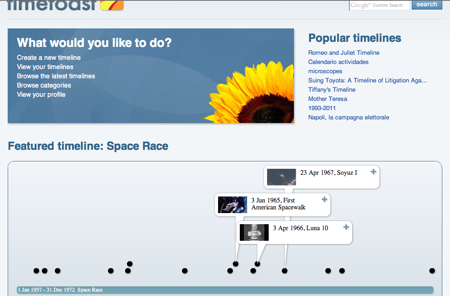
TimeToast
Timetoast is also an easy to use timeline creating website. Again, email addresses are required to create a login (users can also sign in with their Facebook accounts). TimeToast's interface is easier to use than Dipity's, however users do not have the ability to import from outside sources; all events have to be entered manually. People can comment on timelines, however timelines can't be exported, and there are ads.
Screen shot 2011 06 27 at 7 40 00 PM


ReadWriteThink
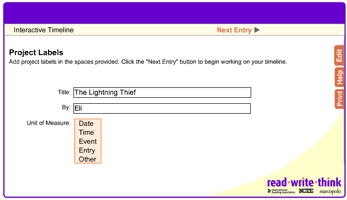
ReadWriteThink is, more often than not, my go-to for materials. The interactive timeline here starts on a screen like this -- and students are able to choose how they want to label their events.
Screen shot 2011 06 27 at 7 42 26 PM

All entries are entered manually, and there are no graphic options. The view is a little confusing -- once you click on "Finished" you are given the option to print or start over; the timeline is appears as you enter data into the form.

Screen shot 2011 06 27 at 7 57 50 PM

It doesn't require a username or password, but I think it's the least aesthetically pleasing of the three.

I think about the things I've been hearing about how we have to engage learners with images and video in addition to the text, and I think this is where the ReadWriteThink interactive timeline falls short. What really makes it interactive? As far as interactive timelines go, I think I like Dipity best, even though users are limited by the number of timelines they can create.

Monday, February 7, 2011

Fake iPhone Text

I got this one from my Twitter feed last week and thought it was intriguing. Using this website, http://www.fakeiphonetext.com, people can create, well, fake iPhone texts.

Screen shot 2011 02 07 at 9 17 20 AMWhat I learned from trying this a few times is that you have to put the name and a colon before the actual text, otherwise it won't work. I'm currently reading Going Bovine by Libba Bray (@libbabray), so I borrowed a conversation from Chapter Fifteen (p. 120) to try it out.

Screen shot 2011 02 07 at 9 21 42 AM

When you hit "Create," what pops out looks like this:

Screen shot 2011 02 07 at 9 22 05 AM

Rather realistic. Each fake iPhone text is given its own URL, so it can be accessed again later. The link above is the the webpage that holds the image.

Imagine creating a conversation between a stomach and the intestinal tract, or between two of the conspirators of the Boston Tea Party (before or after), or even between two characters of a novel, one of whom didn't appear in the scene in question.

All of our 8th graders read The Pearl by John Steinbeck. I could see creating a text message conversation between the head pearl buyer and one of his subordinates, giving instructions about how to proceed with Kino. Or a conversation between Cameron and Janna (now we're back to Going Bovine) after their incident in the hallway at the beginning of the book.

I could see having individual students posting their text conversations on Edmodo, which would hopefully start a conversation about their books.

Bray, Libba. Going Bovine. New York: Delacorte Press, 2009. Steinbeck, John. The Pearl. New York: Penguin, 1973.

Sunday, January 23, 2011

This Week in Links 1/23/11

Flipboard
This one isn't a link, but an iPad app that has recently been updated to include some pretty cool features. During my semester, I usually have a hard time keeping up with my Google Reader. There are so many blogs that I follow that I end up deleting exponentially more than I actually read. Because Flipboarrd now links with my reader, I can read blogs during the week when I'm waiting for other things to happen, which means I miss fewer posts.

Webpage Highlighters:
I came upon these because I have to read a book online this week for class. I wanted to be able to annotate without having to write everything down first. Markkit and Awesome Highlighter are two ways  to do just that. Markkit works with Chrome, Safari and Firefox. For both applications, each highlighted webpage is given its own URL so it can be shared or accessed from other computers.

Awesome Highlighter works within any browser if you only want to highlight that single page. They also have a bookmarklet that works solely with Firefox. Awesome Highlighter has an additional feature: the ability to add notes to a page.

I tried them both and didn't have fantastic luck. Then again, I didn't spend a lot of time with either program. I'm sure it also didn't help that the reading I was trying to do existed on more than one webpage.

Online Stickies
In my continued search for the ability to annotate webpages, I came across Lino It, which is not available to annotate websites, but is like an online cork board. It's similar to a few of the links I posted last week.


- Posted using BlogPress from my iPad

Saturday, January 15, 2011

This Week in Links

I just tweeted:

And I think I will. I know I get so bogged down in classwork that I forget about my Google Reader for weeks at a time. Trying to go through all of those posts is a daunting task. And figuring out what I'm going to read all the way through is even more daunting (this is why titles are important).
What I think I'll try to do every so often is share (and catalogue) the links that I find interesting or useful. I did this once before, but I know I need to get into the swing of semester schedule. Routine is helpful.  So here we go.

Awesome Stories
I've used this site before, but forgot about it. It's a great place for primary sources for all sorts of subjects. In the past, I've used it for history type lessons, but there's so much more information that just that which is related to history. Awesome stories also offers videos and still images. And as far as I've been able to tell, it's all free.

One Word
I've seen this one before too, and it's another that I've forgotten about. On The Pursuit of Technology Integration Happiness, Michael Zimmer offers a few uses for this website.  Check out his post on One Word here.
Zimmer has also created some content specific posts with resources. I'm going to post here a link to his English/Language Arts resources, that way I don't have to pick and choose the links I'd like to include here. Oh, and Zimmer, thanks for being awesome.

Corkboard.me

Corkboard.me is an alternative to Wallwisher and Stixy. Of the three, Stixy is the most versatile, but I think Corkboard.me is the most user friendly, especially when using with students who are luddites when it comes to technology used for education.

The last link I want to leave you with is one to the blog The Concrete Classroom.  Here, the author talks about our "Digital Natives," but with an interesting analogy. It's a short read, so take a look.
I have now cleaned out my Google Reader for this week. *whew.* Now on to finish the reading that I'm trying to get done.

Wednesday, November 24, 2010

Links of Note

I decided I needed to start writing at least biweekly about the links I pull from my Twitter feed. That way, at least they're all in the same place, and I can look anything I've forgotten up using tags. This is what I've got so far:

http://www.ipadcurriculum.com
I'm interested in this only because I'm always curious about what more I can do with my iPad. For the most part, I use it for my college classes (in an effort to be more green), to create last minute presentations when the internet in my hallway at school is down and to allow kids to view videos for Skeleton Creek and Trackers from their desks and not my teacher station. I'm anxious to see what more I can do with this device.

http://www.cybraryman.com/writingprompts.html
A collection of links to writing prompts. Good for timed writing. Has RAFT prompts, some from Six-Traits, and a link to photo prompts. Not a bad resource to have on hand.

http://www.myread.org/
This Australia-based website has information on what readers do and how to help struggling readers in the middle grades. I haven't perused it completely, but put it here to refer back to when I have some time.

http://www.soungle.com/
Royalty free sound effects. (I think this one comes from Google.) Needless to say, I could see how this could work well for school video or Glogster projects.

Saturday, June 28, 2008

Love What You Read

Today, I StumbledUpon another possibly helpful website for those people who are struggling with what to read next. It's called StoryCode.com. Put in a book that you've recently read, review it, and the website will generate a list of books that you might like to read. Or, find the title of a book you've recently read, click on the recommendations button, and the website will generate a list of books that you might be interested in reading. Fairly neat concept, if you ask me. Interestingly, so I could see how it worked, I typed in The Chosen and it generated a list for me. Among those was Flowers for Algernon, which I highly recommend that anyone read. It's one of those heartbreaking books, like Where the Red Fern Grows. That was one of my favorite books as a kid. One that I probably won't read again any time soon since it made me cry. Same thing happened with Million Dollar Baby. I can't imagine seeing that film again, but god, if it wasn't powerful. I digress. Check out StoryCode.com if you're looking for something to read.